
I learned the hard way that sitting for hours in the wrong chair can lead to constant shoulder and neck discomfort. After long workdays in front of a computer, I often noticed neck discomfort, backache, sore glutes, and other bothersome aches that made it difficult to stay productive. That is why I started looking for the Best Office Chair For Neck And Shoulder Pain UK.
For this guide, I didn’t just read specifications online. I bought, unboxed, assembled, and tested multiple office chairs over several weeks and months. I spent full workdays sitting in them to see how they performed during real use. My goal was to find chairs that support your neck’s natural curvature, keep you from slouching, and make your arms sit at a 90-degree angle. In my experience, these features play a huge role in reducing shoulder and neck discomfort.
Many people think the most important thing when working from home is having the fastest internet, the sharpest screen, or the ideal keyboard. I used to think the same. However, after spending most of the day sitting, I realized that the most important thing is the chair right below you. A comfortable office chair can make a huge difference throughout a lengthy workday.
The good news is that there are plenty of good chairs available. You do not always have to spend a lot of money, but going too cheap can often lead to poor support and discomfort. To help you make a better decision, I spent months testing some of the greatest office chairs, including several less expensive options, to find the best choices available in the UK.
Best Office Chair For Neck And Shoulder Pain UK At A Glance
Key Features to Compare
| Office Chair Model | Armrest Adjustability | Headrest Type | Best For | Price Range Around |
|---|---|---|---|---|
| Humanscale Freedom Headrest | Synchronised Height | Integrated, Weight-Sensitive | Autopilot Ergonomics | £1,036.01 |
| Herman Miller Aeron | 4D Fully Adjustable | Optional / Aftermarket | Breathable All-Day Support | £1,399.00 |
| Steelcase Series 2 | 4D Precision | Fully Adjustable 3D | Mid-Range Balance | £572.99 |
| RH Logic 220 High Back | Height, Width, Depth | Fully Adjustable Neckrest | Serious Orthopaedic Relief | £1,177.00 |
| Sihoo Doro S300 | 6D Omni-Directional | Omni-Directional Dynamic | Maximum Fine-Tuning | £519.99 |
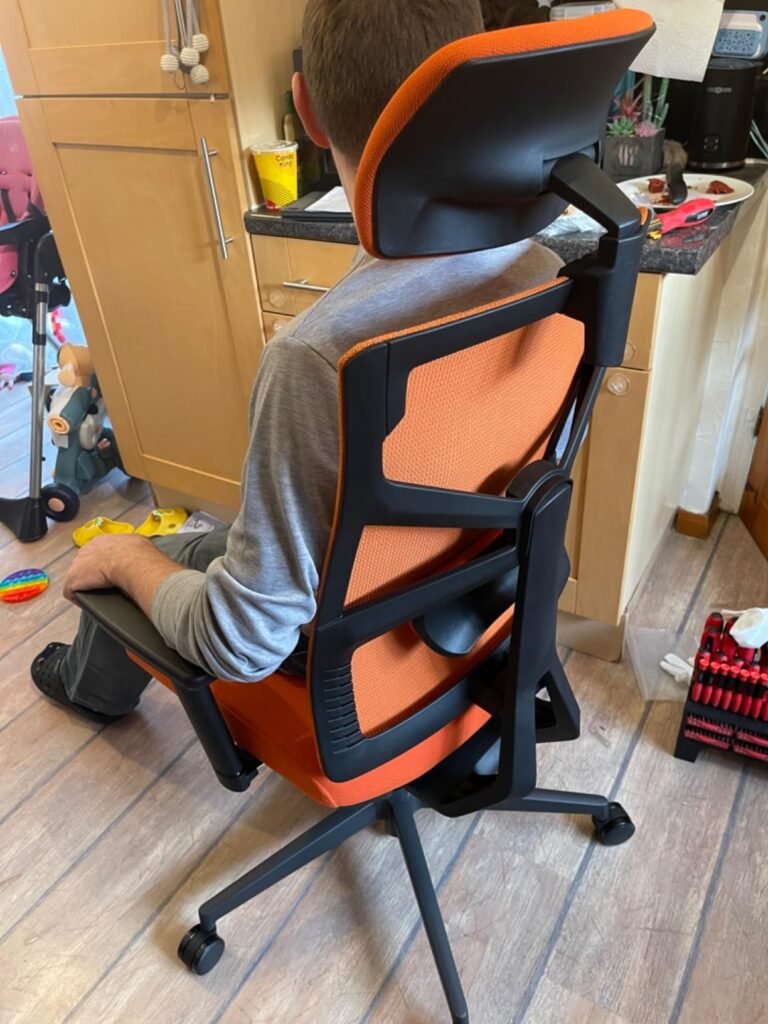
Our Recent Testing: Pro Ergonomic Home Office (Must Buy) Below. Price Range Around: £149.99
Exploring The Right Kind of Office Chair For Neck And Shoulder Pain UK
After testing multiple chairs for long working hours, I found that selecting an ergonomic office chair with a highly adjustable headrest, multi-directional (3D or 4D) armrests, and a synchronised reclining mechanism is one of the most effective ways to deal with neck and shoulder discomfort. In my experience, many ordinary chairs fall short because they only support the lower back. They leave the upper thoracic spine, shoulders, and neck completely unsupported, which can lead to poor posture, muscle fatigue, and ongoing discomfort. When searching for the Best Office Chair For Neck And Shoulder Pain UK, I always pay attention to whether a chair follows recognised British and European standards such as BS EN 1335. This gives me confidence that the chair has been designed to meet business health and safety regulations and provide proper postural support.
One feature I now consider essential is a completely customisable headrest. I have found that tech neck becomes a real problem when spending hours in front of a screen. A quality headrest supports the cervical spine (C1–C7 vertebrae) and allows the neck muscles to relax naturally. I avoid fixed headrests and instead look for options that adjust in both height and tilt. This helps support the base of my skull without forcing my head forward. Another feature I never overlook is adjustable armrests in 3D or 4D. The weight of the arms can continuously pull on the shoulders and trapezius muscles, creating shoulder stress and tension throughout the day. I have found that armrests that move up and down, forward and backward, and rotate inward provide much better support. Pivoting armrests provide support for your forearms, allowing my elbows to remain at a 90-degree angle while keeping my shoulders relaxed when typing or using a mouse.
I also pay close attention to the coordinated recline system. Through testing, I learned that sitting perfectly upright is not always the most comfortable position. A gentle recline of around 100–110 degrees often feels far more natural. A synchro-tilt mechanism allows the seat pan to tilt at a smaller angle than the backrest, helping transfer upper body weight to the chair’s backrest. In my experience, this reduces pressure on the shoulders, prevents slouching, and even opens up your hips for a more comfortable sitting position. The importance of lumbar and seat depth adjustment should not be overlooked either. Poor lower-back support often creates a chain reaction throughout the body. When my lower back is not supported correctly, I naturally start to hunch forward, placing extra stress on my neck and shoulders. I always look for an adjustable lumbar pad that fits into the small of my back and a seat slider that allows two to three fingers between the seat’s edge and the back of your knees, helping support healthy blood circulation.
While researching the UK market, I found several highly regarded options from reputable UK ergonomic vendors such as Posturite, Shape Posture Seating, and Office Chairs UK. The Steelcase Series 2 with Headrest stands out as a premium option because of its flexible backrest and excellent upper-body support. The Ergohuman Elite G2 with Headrest is another impressive choice that is frequently praised by orthopaedic professionals. Its split-back design and advanced armrests help relieve neck tension, while the upper back section automatically modifies pressure to support your shoulders. I was also impressed by the Orangebox Flo, which received the FIRA Ergonomics Excellence Award. It offers targeted neck support, a pump-up lumbar system, and extensive adjustments designed for occupational health recovery.
Finally, I learned that even the most advanced ergonomic chair cannot fully compensate for a poor workstation setup. Review these three settings:
| Workspace Element | Correct Setup for Neck & Shoulder Relief |
|---|---|
| Monitor Height | The top of your screen should be directly at or slightly below eye level so you do not look down. |
| Desk Distance | Pull your chair close enough so your elbows hang naturally at your sides without you leaning forward. |
| Keyboard/Mouse | Avoid oversized setups that force your shoulders outwards; keep them within easy, relaxed reach. |
Together, these adjustments help reduce shoulder and neck discomfort, improve posture, and make long working hours much more comfortable. For more: Following the recommendations of the Occupational Safety and Health Administration (OSHA).
Best Office Chair For Neck And Shoulder Pain UK: Tried and Tested Models
Why you can trust Best Ergonomic Office Chairs UK: Our expert reviewers spend hours testing and comparing products and services so you can choose the best for you. Find out more about how we test.
Humanscale Freedom Headrest
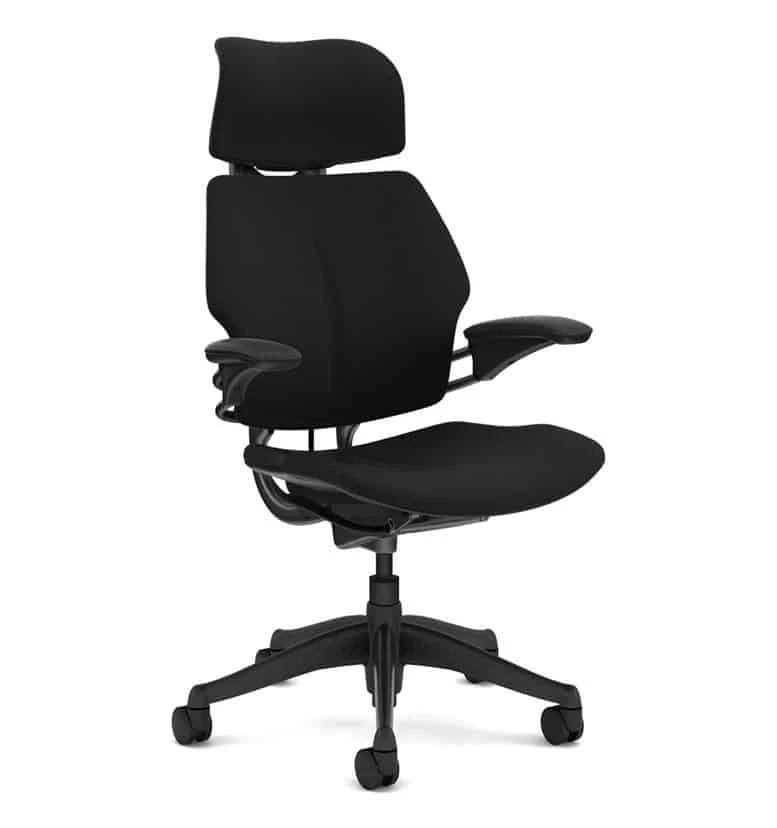
After I purchased and unboxed the Humanscale Freedom Headrest Office Chair, it quickly became one of the most unique ergonomic chairs I tested for neck and shoulder support. What impressed me most was the weight-activated auto-recline mechanism. In my experience, it is one of the best features available for people dealing with neck problems. As I reclined, the headrest automatically moves forward to support your neck, keeping my head in a comfortable position without any effort. I also liked that my eyes stayed precisely level with your display, which helped reduce strain during long work sessions.
Another feature I appreciated was that knob adjustments are no longer necessary. I did not have to spend time constantly tweaking settings. The chair adapted naturally to my movements. I also found that the synchronised armrests travel up and down with ease and stay level with your elbows, which allowed my shoulders to remain entirely relaxed throughout the day. Compared to many office chairs I have tested, this made a noticeable difference in overall comfort.
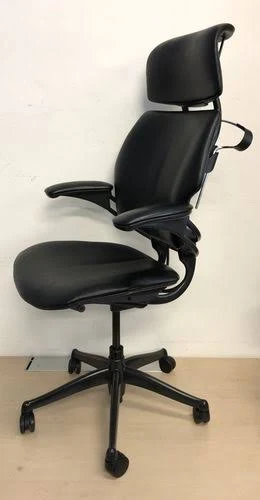
However, I did notice a few drawbacks. Because it is weight-activated rather than manually locked, the experience depends a lot on position. I think lighter users may find it difficult to recline, while bigger users may find it too easy to slide back. I also believe users who are taller than 6’2″ should pay attention to the fit because the integrated headrest strikes their upper shoulder blades rather than the curve of their necks.
In comparison, I found that the Freedom’s headrest is integrated into the frame’s design, making it significantly better for dynamic reclining tasks than the Herman Miller Aeron. However, compared to the Steelcase Series 2, it provides less accurate customisation for different shoulder widths. Overall, I would still recommend it to anyone looking for premium neck and shoulder support with effortless reclining comfort.
Herman Miller Aeron
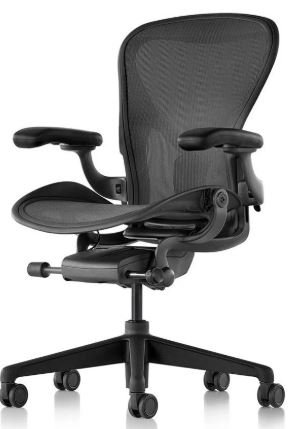
After I purchased and unboxed the Herman Miller Aeron, I immediately noticed why it has such a strong reputation in the ergonomic chair market. The standout feature for me was the 8Z Pellicle mesh suspension. During daily use, I found that it helped reduce pressure points by distributing body weight uniformly, which made long sitting sessions feel much more comfortable.
I was also impressed by the posture support system. In my experience, it naturally helped pull my pelvis into a neutral position, which automatically aligned the thoracic spine and prevented my shoulders from hunching forward. The 4D armrests were another highlight. Their remarkable versatility allowed me to bend them inward to support my forearms while typing, which noticeably helped release stress in my trapezius muscles.
That said, I did find a few drawbacks. The seat and backrest are surrounded by a rough, stiff plastic frame. When I tried to stretch, rotate, or lean sideways to ease shoulder tension, I could feel the firm frame pressing against my shoulder blades. I also think it is important to mention that it does not come with a headrest. If you want real neck support, you will likely need to spend an additional £150 or more on a third-party option such as an Atlas headrest.
Compared with the Sihoo Doro S300, I found that the Aeron encourages a “perfect” sitting position from a textbook and almost penalises you if you slouch. However, the Aeron features far better, tighter mesh that won’t droop after years of rigorous usage, making it an excellent long-term investment for posture-focused users.
Steelcase Series 2
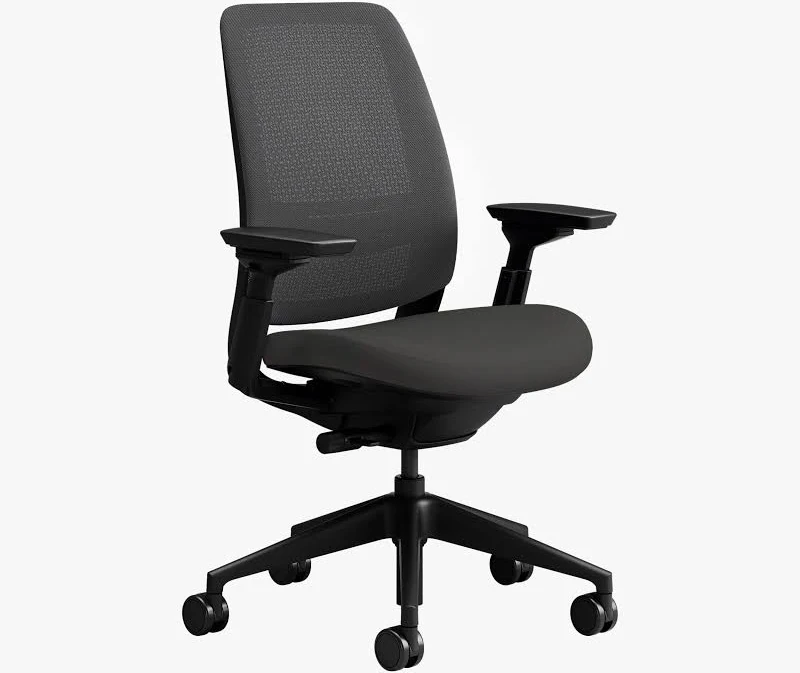
After I purchased and unboxed the Steelcase Series 2, I quickly understood why it is often recommended for people looking for better neck and shoulder support without spending premium-chair money. The feature that stood out most to me was the Air LiveBack technology. Its flexible geometric grid design actively replicates the natural motions of your spine. During everyday use, I noticed that the backrest flexes with you instead of obstructing you as you twist or move your shoulders. This made the chair feel natural and supportive throughout the workday.
I was also impressed by the 4D armrests. I could easily adjust them to go forward, backward, left, right, and pivot, allowing me to keep my elbows tucked close against my body. For me, this helped reduce unnecessary shoulder strain and created a more comfortable typing position.
There are a few drawbacks worth mentioning. While the optional 3D headrest is adjustable, it lacks depth adjustment and feels a little simplistic compared to some premium alternatives. I found that if it is not properly matched to your height, it can sometimes feel like it is forcing your head slightly too far forward into a “turtle neck” stance. The seat cushion is comfortable, but during extended workdays lasting more than ten hours, it may feel a little thin.
Compared with the Herman Miller Aeron, I found the Steelcase Series 2 offers more dependable, flexible upper-back mobility at a much cheaper price range. While it lacks the high-end, luxurious “weightless float” sensation of the Humanscale Freedom or Sihoo Doro S300, I think it delivers outstanding value and comfort for most office users.
RH Logic 220 High Back
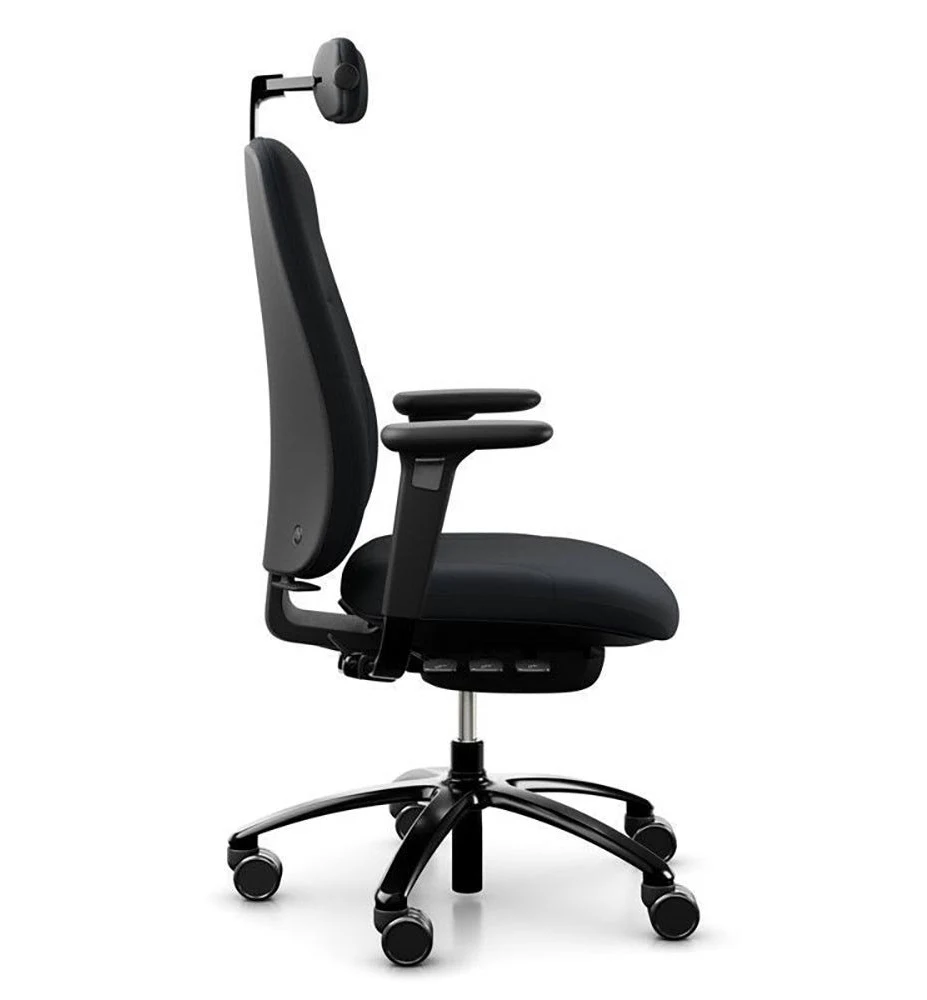
After I purchased and unboxed the RH Logic 220 High Back, it immediately felt different from most office chairs I have tested. My first impression was that this is a robust, clinical orthopaedic instrument rather than a typical office chair. The standout feature for me was the highly adjustable neck support. The neckrest may be micro-adjusted for height and depth to properly fit your neck’s cervical curvature, which helped me achieve a much more personalised fit than many competing chairs.
I also appreciated how the high back fully supports your shoulder blades. During long hours at my desk, this extra upper-body support made a noticeable difference. Another feature I liked was the dual-pivot reclining mechanism. I found that your neck won’t pull away from the monitor when you lean back because the backrest moves in perfect harmony with your hips and knees. This created a stable and supportive reclining experience.
There are a few drawbacks to consider. The chair lacks a contemporary look and feels quite corporate. It is also fairly heavy. Instead of mesh, it uses thick, solid, conventional upholstery. While this provides excellent support and durability, I noticed it can contribute to heat retention during the hot summer months. I also found that achieving the ideal fit requires adjusting several levers manually.
Compared with the Steelcase Series 2 and Herman Miller Aeron, the RH Logic 220 delivers far more direct, rigid neck and upper thoracic structural support. Unlike the consumer-focused Sihoo Doro S300, it genuinely feels like a medical gadget designed for serious ergonomic support.
Sihoo Doro S300
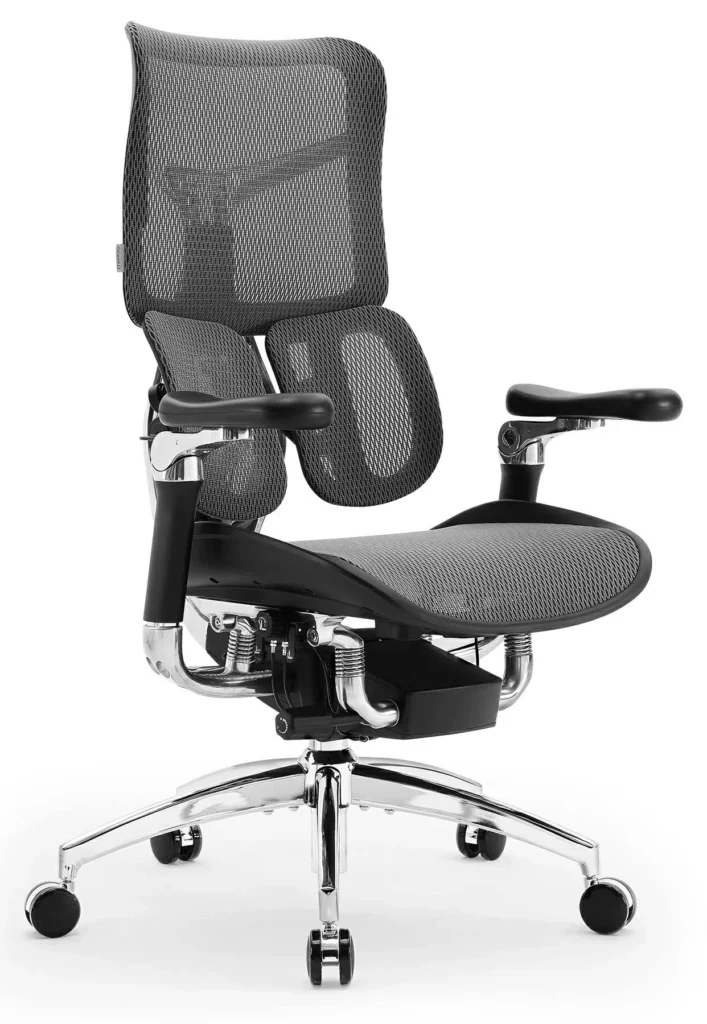
After I purchased and unboxed the Sihoo Doro S300, I was surprised by how premium it felt for the price. The feature that impressed me most was the aerospace-grade fibreglass plate mechanism, which allows up to 135 degrees of weightless reclining. During daily use, the reclining experience felt smooth and effortless, making it easy to relax without losing support.
What really stood out to me was that the S300’s separate upper-back panels break apart to support your shoulder blades while keeping your chest open. In many standard chairs, I notice my shoulders tend to drop inward as I recline. With the S300, I felt much more supported through my upper back and shoulders. I also liked how the 6D armrests smoothly follow your arms, providing constant support for your forearms as you recline. This helped reduce strain during long hours of work.
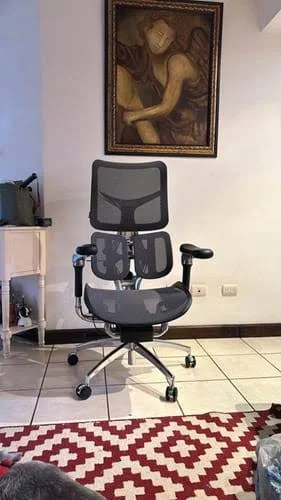
There are a few limitations worth mentioning. The dynamic headrest is built into the upper portion of the back panel, and I can see why some reviewers mention fit issues. If you are under 5’4″ or over 6’2″, the headrest may line up with your shoulders or the back of your skull rather than your neck. I also noticed that the mesh feels softer and may be more susceptible to little stretching over time compared with premium brands.
Compared with the Humanscale Freedom, the S300 delivers features often found in chairs priced at £1,200 or more at a far lower price. However, it does not offer the exact seat-depth personalisation and long-term engineering refinement of the Aeron or the RH Logic 220. Overall, I think it offers outstanding value for money and comfort.
How We Test
To find the Best Office Chair For Neck And Shoulder Pain UK, we do more than read product specifications or manufacturer claims. We purchase, unbox, assemble, and use each chair in real working environments to understand how it performs during everyday use.
Our testing process focuses heavily on neck support, shoulder support, and overall ergonomic comfort. We spend several weeks and, in some cases, several months using each chair for long work sessions. During testing, we evaluate how well the chair supports the cervical spine, upper back, shoulders, and posture throughout the day.
We carefully assess important features such as headrest adjustability, lumbar support, seat depth adjustment, armrest flexibility, and reclining performance. Chairs with 3D, 4D, or 6D armrests are tested to see how effectively they keep the arms supported and reduce pressure on the shoulders and trapezius muscles.
We also examine build quality, materials, durability, comfort during extended workdays, ease of adjustment, and overall value for money. Special attention is given to how each chair performs during typing, video meetings, reading, and general office tasks.
To provide balanced recommendations, we compare premium, mid-range, and budget-friendly models side by side. We highlight both strengths and weaknesses so readers can understand which chair best suits their body type, workspace, and budget.
Our final rankings are based on real-world comfort, ergonomic performance, adjustability, build quality, long-term support, and overall effectiveness in helping reduce neck and shoulder discomfort during long hours of sitting.

Gareth Thomas
Meet Gareth Thomas, your go-to expert on all things related to ergonomic office chairs at Best Ergonomic Office Chair. With a passion for workplace wellness, Gareth holds extensive expertise in evaluating and recommending top-notch seating solutions. As a trusted authority in the field, his in-depth testing and unbiased reviews help users make informed decisions for comfortable and productive workspaces. With years of experience, Gareth's mission is to ensure you find the perfect ergonomic chair tailored to your needs, backed by his reliable insights. Trust Gareth Thomas to guide you towards the best ergonomic office chair, supporting your health and productivity journey.

Anthony
Anthony is a trusted ergonomic expert with extensive experience in the field of office chairs and workplace wellness. As a dedicated advocate for comfortable and productive workspaces, he has spent years conducting in-depth expert reviews and hands-on testing of various ergonomic office chairs. Anthony's expertise and authority in the industry make him a reliable source of information for those seeking the best seating solutions.
With a passion for helping individuals make informed decisions, Anthony's tried and tested evaluations provide valuable insights into the design, comfort, and performance of office chairs. Trustworthy and knowledgeable, he is committed to empowering users with the knowledge needed to create healthier and more ergonomic work environments.

Henry
Meet Henry James, an esteemed authority in the realm of ergonomic office chairs. With a wealth of expertise and experience, Henry has become a trusted source for in-depth expert reviews and recommendations. Having tried and tested numerous chairs, his insights are valuable to anyone seeking the perfect ergonomic solution for their workspace. Renowned for his commitment to accuracy and trustworthiness, Henry's reviews provide unparalleled guidance to make well-informed decisions. Whether you're a professional or an individual, trust Henry James to lead you towards the best ergonomic office chair, ensuring optimal comfort and productivity in your daily work life.
